Ventusky: Weather Forecast
- 4.6
- Rating
- 1.00M
- Installs
- Free
- Price

 Analysis by App-foxy
I noticed Ventusky: Weather Maps & Radar because it treats weather less like a single number and more like a moving picture. After using it for everyday forecasts, map browsing, and changing conditions, I found an app that is immediately interesting but also more demanding than a basic weather widget. It is free to start, suitable for Everyone, and developed by Ventusky. Its 4.7 average from over 21 thousand ratings and more than a million installs suggest that many people find the visual approach useful rather than merely attractive.
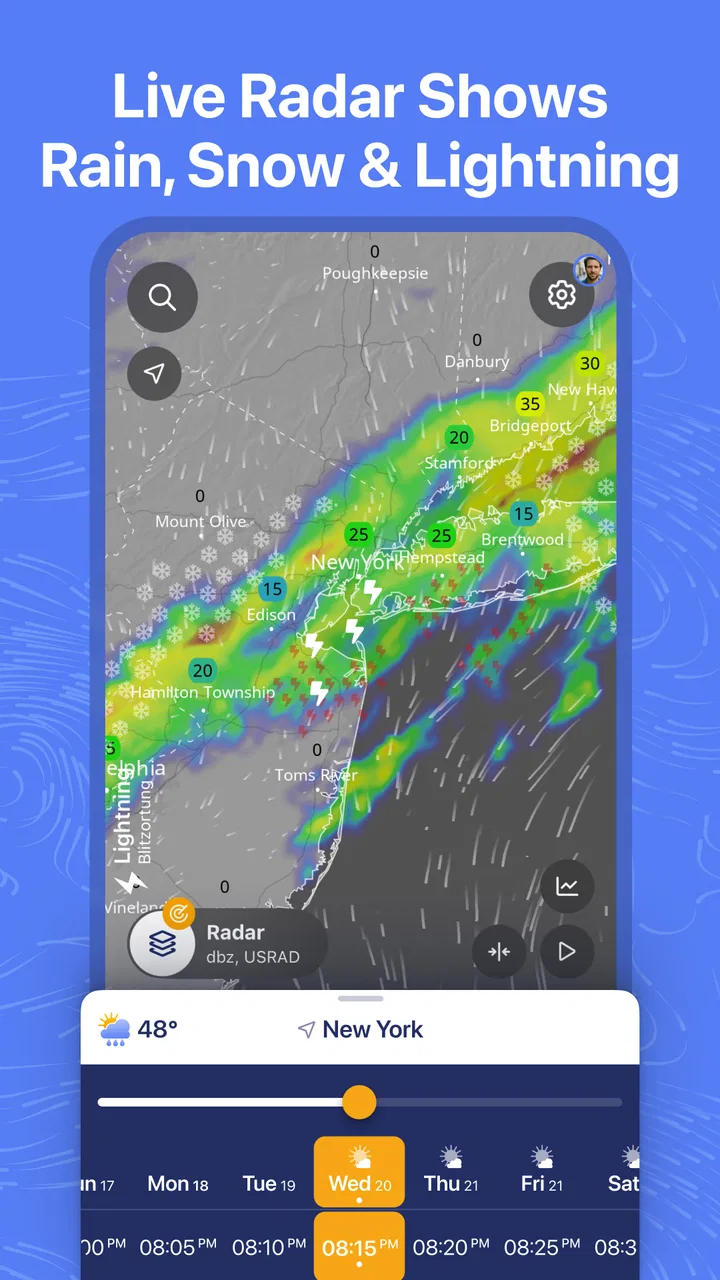
My first impression was that this is built for people who want to understand what the weather is doing, not only whether they should carry an umbrella. The app combines forecasts with more than 80 weather maps, live radar, and tools for following storms and hurricanes. That range gives it a strong first-week appeal: there is always another layer to inspect. The important question, though, is whether those layers remain useful after the novelty wears off. In my experience, the answer depends heavily on how you make weather decisions.
From impressive maps to a useful daily habit
I’ll look beyond the maps’ initial visual appeal and focus on how they can fit into a practical routine: what I check, when I widen the view, and how I keep the detail from becoming a distraction. That distinction matters because a weather tool earns its place through useful decisions, not novelty alone.
You May Also Like

 Blood Strike: 2.5 Anniversary
Blood Strike’s Loadouts Turn Every Drop Into a Tactical Gamble
A close look at Blood Strike’s custom loadouts: how fast access to signature weapons reshapes its battle royale rhythm, rewards preparation, and narrows the gap between fights.

 Pandora - Music & Podcasts
Pandora’s Music Is Easy to Start, but Harder to Recover
Pandora’s strength is its low-effort path from a seed to a station. Its weak spot is how much confidence it asks you to place in connection, setup, and quiet recovery.

 8 Ball Pool
 Is Built on Rivalries, Rematches, and Routine
A close look at the rivalries, rematches, shared routines, and unanswered safety questions that turn a quick pool match into a persistent mobile community.

 Samsung Music
’s Quiet Strength Is Playing What You Already Own
Its reach comes less from spectacle than from dependable access to a personal library. That simplicity is both the app’s strongest retention engine and its ceiling.

 AccuWeather: Weather Radar
AccuWeather Review: A Quick, Clear Forecast for Everyday Decisions
For everyday plans, the best forecast is the one you can understand quickly. AccuWeather makes rain timing, radar, and local conditions easy to act on, with a few trade-offs.

 Hill Climb Racing
Why Hill Climb Racing Still Turns Crashes Into One More Run
A tiny car, a bumpy hill and one more upgrade: Hill Climb Racing keeps resurfacing because its simple chaos makes every near-miss feel personal.
More From Our News Desk



The first week is full of visual discoveries
The opening experience is easy to understand even when the amount of information feels large. A map gives the forecast a geographic context, so I can see weather moving across a wider area instead of reading a forecast as an isolated statement about one town. That matters when a front is approaching, when rain is likely to arrive later, or when a storm system is developing nearby.
The animated presentation is the feature that makes the app memorable. Rather than jumping between unrelated forecast entries, I can follow how a weather pattern changes across the map. This is especially helpful when deciding whether a short outdoor activity fits into a gap between showers. A standard weather app may say that rain is expected in the afternoon; Ventusky helps me investigate whether the rain appears as a brief band, a broad system, or something that is likely to shift.
During the first few days, I recommend resisting the temptation to open every available map. Start with the layers that answer your actual questions. Use the forecast view for planning, radar when rain is close, and storm tracking when a larger system matters. This simple approach keeps the app from becoming a colorful but confusing collection of information.
A realistic commute and weekend workflow
Imagine that I need to cycle to work in the morning and return later in the day. I first check the forecast around both travel periods, then move to the radar to see whether precipitation is already forming nearby. If the map shows a narrow area of rain moving toward my route, I can compare its direction and timing with the journey rather than relying only on a general daily icon.
For a weekend walk, I use a wider view. A local forecast can look acceptable while a larger weather pattern is moving toward the area. The map makes that broader context visible, which is one of the app’s strongest practical advantages. It does not remove uncertainty, but it gives me more evidence before I commit to a plan.
The same workflow can help with gardening, photography, driving, outdoor work, or a small trip between nearby towns. The benefit is not that the app magically predicts every change. The benefit is that I can inspect the relationship between location, timing, and movement instead of treating the forecast as a fixed label.
Why the visual approach is more than decoration
Many weather apps use graphics mainly to make a forecast pleasant to read. Here, the map is part of the explanation. A rain symbol over one location tells me very little about what is happening around it. A moving map can reveal whether nearby areas are experiencing the same system and whether conditions are spreading or clearing.
This makes the app particularly useful for users who think spatially. If I travel between locations, follow outdoor conditions, or live in an area affected by changing coastal or mountain weather, the map can answer questions that a compact forecast card cannot. I also find it easier to notice uncertainty when I can compare a local point with the surrounding pattern.
There is a trade-off. The visual display asks me to interpret information rather than simply receive an instruction. Someone who wants to glance at a temperature and leave may find the map excessive. Someone who wants to know why the forecast looks unsettled will probably appreciate the extra context.
Storm and hurricane tracking without sensationalism
The storm and hurricane tracking tools are valuable when serious weather is developing, because they put the event into a broader geographic frame. I can follow the movement of a system and inspect the surrounding conditions instead of depending on a single headline or social media post.
I would still treat this app as a planning and monitoring tool, not as a replacement for official emergency instructions. During dangerous weather, local authorities and emergency services should take priority. Ventusky is useful for understanding the map, but it should not be the only source guiding a safety decision.
What the paid layer changes in my decision
The app is free, while in-app purchases range from $3.99 to $24.99 per item. That makes trying it straightforward, but the purchase question is more personal than technical. Casual users can decide whether the free experience already covers their normal forecast needs. People who repeatedly inspect specialist maps or rely on the app for outdoor planning may see more value in paying for the tools they actually use.
I would not buy anything during the first session. I would use the free version through several weather changes and notice which maps I return to. If I only open the app to check tomorrow morning, an upgrade may not improve my routine. If I regularly compare conditions across an area, monitor storms, or need deeper visual context, the paid options become easier to justify.
The first month reveals whether it has staying power
After the initial curiosity fades, the app becomes less about exploring maps and more about establishing a repeatable check. My preferred habit is brief: look at the local forecast, inspect radar when precipitation is relevant, and expand to the wider map only when the day is uncertain. This keeps the app useful without turning every decision into a weather research project.
The month-to-month value comes from changing conditions. A simple forecast app can be enough during predictable weeks, but Ventusky becomes more useful when I need to understand transitions: rain arriving later, wind patterns affecting a route, or a storm system changing the outlook. Its value rises with the complexity of the decision.
That also means its usefulness is uneven. On a calm day with no outdoor plans, I may have no reason to open the maps. The app does not create a need for itself every day. Instead, it earns a place when weather affects what I am doing.
Three habits that make the maps more practical
Check the surrounding area, not just the destination. When I am traveling, I inspect the route and nearby regions rather than focusing on one saved point. This helps reveal whether a change is local or part of a larger system.
Use radar for immediate questions and forecast maps for planning. I find radar more useful when rain is already relevant, while broader forecast views help me think about later in the day or the next outing. Mixing those purposes can make the display feel less clear.
Compare the map with the actual sky before trusting a narrow window. A visual forecast can suggest a promising gap, but weather shifts. I use the app to improve a decision, not to turn a forecast into a guarantee.
These habits are what separate lasting value from the first-week novelty. The app has enough depth to reward repeated use, but only if I approach it with a question. Opening random layers every morning is less useful than checking one relevant map with a clear purpose.
Where the maintenance burden appears
Ventusky does not require much maintenance in the usual sense. I do not need to build a complicated dashboard to benefit from it, and the basic routine can remain quick. The real burden is attention. Because the app offers so much visual information, I need to decide which layer matters instead of assuming that more detail automatically means a better forecast.
That is a manageable cost for weather-aware users, but it is still a cost. A person who wants a notification, a simple temperature, and a rain chance may find the app asks too many questions in return for information they did not request. The interface can feel more like a compact weather workstation than a glanceable utility.
Another maintenance issue is interpretive discipline. When a map looks precise, it is tempting to treat every boundary as exact. I have to remember that forecast maps describe changing conditions and should be read as guidance. The more closely I zoom into a specific plan, the more cautious I become about small differences in timing or location.
When the detail becomes tiring
The main source of fatigue is choice. More than 80 map types sound generous, and they are, but a large menu can slow down the simple task of checking the weather. A new user may wonder which layer is authoritative for a particular question, what the colors mean, or whether a different map would lead to a different conclusion.
I also find that animation can encourage overchecking. It is satisfying to watch conditions move, but watching the same forecast repeatedly does not necessarily make the decision better. I get the most from the app when I set a purpose, inspect the relevant time range, and close it.
There is a second kind of fatigue during severe weather. Storm tracking can make an event easier to follow, but frequent map checks can also increase anxiety. The app is most helpful when it supports calm preparation. If I am already overwhelmed by warnings, I would use official alerts first and keep this app as a secondary visual reference.
Who should choose something simpler
I would not make this my first recommendation for someone who only wants a quick daily forecast. A simpler weather app or phone widget is likely better for checking the temperature while leaving home. Those alternatives reduce friction and keep the answer visible without asking the user to interpret a moving map.
I would also hesitate to recommend it to someone who expects one forecast number to settle every decision. Ventusky is strongest when I want context, not certainty. It helps me investigate conditions, but it cannot eliminate the need for judgment, especially when plans depend on a small weather window.
On the other hand, travelers, hikers, cyclists, gardeners, photographers, drivers, and anyone who plans around changing weather can gain something distinctive here. The app is also a good fit for curious users who enjoy seeing how weather systems connect across a region. For those people, the extra detail is not clutter; it is the reason to keep the app.
How it compares with ordinary weather apps
The usual alternative is a forecast card with current conditions, hourly entries, and perhaps a radar shortcut. That format wins on speed. I can open it, read the answer, and move on. Ventusky wins on explanation and geographic awareness. It shows me the weather as a system rather than only as a result for one location.
Neither approach is universally better. If I am deciding whether to wear a jacket, the simpler app may be more efficient. If I am deciding whether to drive across a region, schedule outdoor work, or follow a developing storm, the map-based approach gives me more useful context.
The trade-off is that Ventusky rewards learning its visual language. I need to become comfortable with moving through time, switching layers, and reading patterns. That learning curve is not severe, but it is real. I would rather spend that effort when weather genuinely affects my routine than simply because the app offers many options.
Does it earn a permanent place?
For me, the long-term verdict is positive, with a clear condition: I keep it because I use the maps to make decisions, not because the interface is impressive. The first-week appeal comes from exploring the animated weather view. The lasting value comes from returning to a small set of useful workflows for commuting, outdoor plans, travel, and storm awareness.
The free entry point makes experimentation easy, and the Everyone age rating keeps it broadly accessible. Its release on December 19, 2017, also reflects that this is an established weather app rather than a brand-new experiment. The combination of a strong 4.7 average, over a million installs, and a substantial body of user feedback gives me confidence that it has remained relevant to a wide audience.
Still, I would not keep every map active or check it constantly. The app is at its best when I let it answer a specific question and then stop. I would consider an in-app purchase only after identifying a recurring need, not simply to unlock more curiosity. That approach keeps the cost connected to real use.
My recommendation is simple: choose Ventusky if you want to understand weather movement, not merely read a forecast. It earns lasting space on my phone because its maps add practical context to situations where a basic weather icon feels too vague. If all I need is a fast glance before leaving home, I would choose a lighter alternative. For anyone whose plans depend on timing, distance, or developing conditions, this is one of the more useful weather habits I have found.
In the end, the app succeeds by turning weather into something I can inspect and reason about. That makes it more engaging than a standard forecast, but also more demanding. Used selectively, it becomes a dependable companion for uncertain days. Used without a purpose, it can become another source of information fatigue. I would keep it, and I would recommend it to a friend who regularly asks not only “Will it rain?” but also “Where is it coming from, and when will it reach me?”
FAQs for Ventusky: Weather Forecast
01What features does Ventusky: Weather Maps & Radar offer?
Ventusky provides detailed weather forecasts with an interactive map interface. Users can explore real-time data on temperature, precipitation, wind speed, and atmospheric pressure. The app is equipped with radar images, providing animated visualizations of weather patterns. It also offers forecasts up to 10 days in advance, making it a comprehensive tool for weather enthusiasts.
02Is Ventusky: Weather Maps & Radar free to use?
Ventusky offers both free and premium versions. The free version provides access to basic weather data and maps. For more advanced features, such as extended forecasts and additional data layers, users can opt for a subscription. This allows for a more in-depth analysis of weather conditions.
03How accurate is the weather information provided by Ventusky?
Ventusky sources its data from reputable meteorological models, ensuring high accuracy. It integrates multiple weather models, including GFS, GEM, and ICON, to provide precise forecasts. However, like all weather apps, occasional discrepancies may occur due to the complex nature of weather prediction.
04Can Ventusky be used offline?
Ventusky requires an internet connection to access real-time data and updates. The app does not store data locally for offline use, so users need to be connected to the internet to utilize its features fully. This ensures that information is always current and accurate.
05Is Ventusky: Weather Maps & Radar user-friendly for beginners?
Yes, Ventusky is designed with an intuitive interface, making it accessible for users of all experience levels. The app offers a simple navigation system, with interactive elements that provide detailed explanations. Beginners can easily learn to interpret weather data, while advanced users can delve into more detailed analyses.
Pros
- Detailed weather visualizations.
- Real-time radar updates.
- Intuitive user interface.
- Global coverage included.
- Customizable layers.
Cons
- Requires constant internet connection.
- Battery consumption can be high.
- Limited free features.
- Occasional lag in data refresh.
- Ads in free version.

Ventusky: Weather Forecast
Gallery